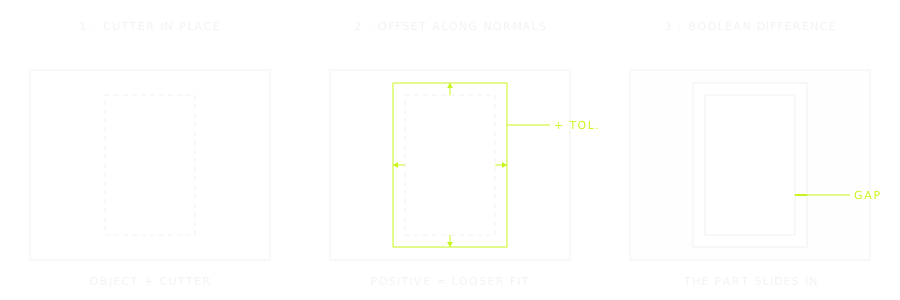
Tolerance Boolean is a free add-on for Blender that adds a boolean with clearance. Before cutting, it pushes the cutter’s surface outwards (or inwards) along its normals by the amount you set, so a hole for a peg, a socket for a magnet or the gap of a print-in-place joint comes out with the play a 3D printer needs, without scaling or remodelling the cutter.
Why a boolean with clearance
A printed part is never exactly the size of the model: lines spread a little, and two parts drawn to fit perfectly will not fit at all. The usual fix is to scale the cutter, but scaling moves every face by a different amount and distorts long or off-centre shapes. Offsetting along the normals moves every face by the same distance, which is what a clearance is.
What it does
- Difference, Union or Intersect, with the Manifold, Exact or Float solver.
- Tolerance: the offset along the normals. Positive gives a looser fit, negative a tighter one. The default is 0.2 mm.
- Object or collection as the operand. A collection can be placed on the empty that instances it, so a set of cutters you reuse across a model works as one; instances are realized automatically.
- Non-destructive. It is a Geometry Nodes modifier: change the cutter, the tolerance or the operation at any time.
How to use it
- Select the cutter (a mesh, or an empty that instances a collection), then the object to cut, so that it is active.
- Add the modifier from Add Modifier › Generate › Tolerance Boolean. The cutter is set automatically and shown as wireframe.
- Set the tolerance and the operation in the modifier panel.
Requirements
| Blender | Licence | Install |
|---|---|---|
| 4.5 or later (tested on 5.2) | GPL-3.0-or-later | Edit › Preferences › Get Extensions › Install from Disk, then choose the zip |
Frequently asked questions
How much clearance should I use?
0.2 mm per side is a good start for PLA on a 0.4 mm nozzle; print a small test and adjust. Print-in-place joints usually need a little more than parts assembled by hand.
Is it free?
Yes. Download it below, no sign-in needed. The source code is on GitHub, under the GPL.