Islamic Geometric Pattern Generator is a Blender add-on that builds Islamic star patterns and Japanese kumiko lattices as real geometry. The patterns come from the classic “polygons in contact” method: a tiling of polygons, lines drawn from the midpoints of their edges at a contact angle, and the star pattern emerges where they meet. Everything stays parametric, and the result is a closed, manifold solid you can cut, emboss or print.
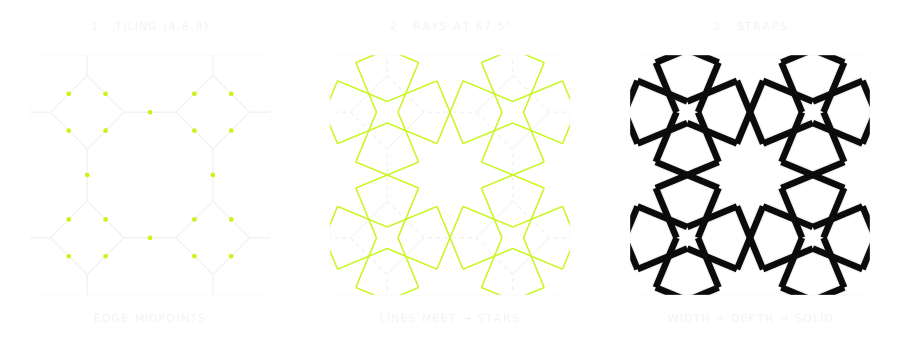
What it does
- Seven tilings as a base: square (4.4.4.4), hexagonal (6.6.6), triangular, octagon and square (4.8.8), kagome (3.6.3.6), dodecagon and triangle (3.12.12), dodecagon, hexagon and square (4.6.12).
- Nine kumiko motifs, each on its own grid so it lines up with the Islamic layers of the same family: asa-no-ha, goma-gara, mitsu-kude, kaku-asanoha, yotsu-kude, masu-tsunagi, izutsu-tsunagi, kikko and kagome.
- Layers: stack several patterns, switch each on and off, offset and rotate them, for moiré and interlaced effects. Copy, paste and duplicate layers.
- Contact angle per polygon (triangles, squares, hexagons, octagons, dodecagons), plus delta and controlled randomness with a seed for angle and delta jitter.
- Sharp, printable lines: lines become ribbons with mitred joints computed node by node, and crossings are split, so the mesh comes out closed and ready for booleans.
- Colour fill: the cells enclosed by the lines become coloured faces, with congruent cells sharing a colour; recolour single cells by hand and keep the choice across rebuilds.
- Seamless tiles: cut the pattern to a square, rectangle, rhombus or hexagon tile that repeats without seams.
- Line width, depth, bevel and a live update while you change parameters.
How to use it
Open the side panel (N) and the Islamic Pattern tab, create a new pattern and shape it with the layer settings. Use it as a relief, cut it into a surface with a boolean, or print it as a lattice.
Requirements
| Blender | Install |
|---|---|
| 4.2 or later | Edit › Preferences › Get Extensions › Install from Disk, then choose the zip |
Availability
The add-on is for Alchemic Matter patrons on any paid Patreon tier. Sign in below to download it.